Version 2.17 Beta 1

  • This version officially supports Windows 10 and Windows 11.
  • Also confirmed to work with Windows 7 and Windows 8, with some minor GUI visual artefacts, though.
  • Report bugs to feedback@asio4all.com!

Changes since version 2.16:

  • Re-wrote large portions of the WaveRT code, thus improving support for not just
    various on-board audio solutions. What didn’t work before has a fair chance of working now.
  • Prevent performance drop when host application window is minimized or fully occluded..
  • Remove disconnected BT devices from the WDM device list.
  • “Allow Pull Mode” switch has been renamed to “Alternative Buffer Synchronization”, because this is closer to what it does.
    ASIO4ALL will pick the WaveRT buffering mode most suitable for any individual device. This checkbox lets you try an alternate mode for better or for worse.
  • The “Buffer Offset” Slider in the “Options” section now only works per pin. Also, it has become unit-less. The range of the slider represents the entire circular buffer of the current pin, allowing you to apply an offset relative to the audio cursor. Use only to fix crackles due to synchronization errors between devices.
    Generally, this slider should remain in its leftmost (default) position, because most of the synchronization work is done automatically.
  • Fixed numerous other little bugs here and there…
  • Known issue: on-board audio input on Lenovo Legion shows “beyond logic”.
    IRP_MJ_CREATE for the pin is rejected when not issued by audiodg.exe.
    I’m currently at a total loss with this one.
    Also, the manual isn’t updated yet.


Posted

in

,

by

Tags:

Comments

11 responses to “Version 2.17 Beta 1”

  1. Hola
    Gran aporte de este programa, pero tengo un problema y es que no hay manera de que me deje abrirlo. Me manda a la pagina web

    Gracias

  2. That’s correct. However, this microphone slot has high background noise, and the device runs stably on 64-bit but crashes instantly on 32-bit (it crashes right after plugging in). It’s likely that the offline settings also read 32-bit DLLs, leading to the same crash issue. I’ve purchased various USB devices to test ASIO4ALL for this problem.

  3. 32-bit ASIO4ALL cannot be launched when USB devices like HS100B and CM108B are connected.
    (连接 HS100B、CM108B 等 USB 设备时,32 位版 ASIO4ALL 无法启动。)

    1. Michael Tippach Avatar
      Michael Tippach

      Like e.g. one of these? Just making sure…
      https://www.amazon.com/dp/B0776QNHKD/

      1. That’s correct. However, this microphone slot has high background noise, and the device runs stably on 64-bit but crashes instantly on 32-bit (it crashes right after plugging in). It’s likely that the offline settings also read 32-bit DLL, leading to the same crash issue. I’ve purchased various USB devices to test ASIO4ALL for this problem.

      2. That’s correct. However, this microphone slot has high background noise, and the device runs stably on 64-bit but crashes instantly on 32-bit (it crashes right after plugging in). It’s likely that the offline settings also read 32-bit DLLs, leading to the same crash issue. I’ve purchased various USB devices to test ASIO4ALL for this problem.

      3. ASIO4All 32-bit will crash when a native 16-bit USB audio device is connected, and I’ve tested this with other USB audio chips and got the same result. It won’t crash if the USB audio chip supports 24-bit.

        1. Michael Tippach Avatar
          Michael Tippach

          Confirmed using a 150-year-old SoundBlaster MP3+ 😉
          Looking into it…

          1. Michael Tippach Avatar
            Michael Tippach

            … nailed it!

            Only happening when ASIO4ALL replaces the generic “USB Audio” string with Vendor information based on VID/PID.

            Fixed in next release.

          2. Perfect! Thanks so much for confirming and fixing it. Really appreciate your quick work—looking forward to the next release!

          3. Thanks for your advice. I’ve fixed it too—just made it stop searching for the usb\vid string, haha.

Leave a Reply

Your email address will not be published. Required fields are marked *

This site uses Akismet to reduce spam. Learn how your comment data is processed.

ASIO is a trademark of Steinberg Media Technologies GmbH.  All other trademarks are the property of their respective owners, used for product identification purposes only.

  • Getting Started

    Getting Started

    Setting up your audio software In order to make use of ASIO4ALL, you need to configure your audio software accordingly. How you would do this depends on your particular software application. Generally, you would always enter the audio configuration menu and select ASIO -> ASIO4ALL v2. There now should be a button to launch the

    more

  • WDM Device List

    WDM Device List

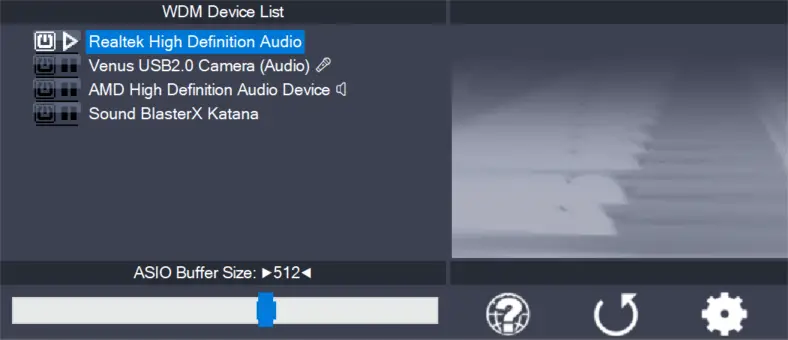
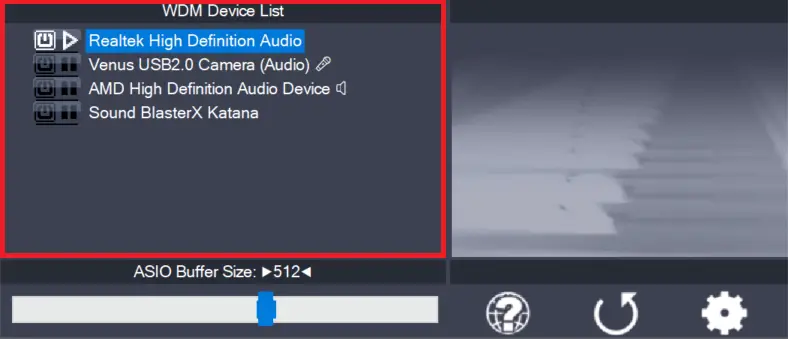
    This is the list of audio devices found in your system. Highlight the device that you want to make changes to. Note: All parameter changes always only apply to the device currently highlighted! Activate the device you want to use by clicking on the button next to the device name! In the picture above, the

    more

  • ASIO Buffer Size

    ASIO Buffer Size

    Use the slider to adjust the ASIO buffer size for the device currently highlighted. Smaller buffer size means lower latency. Once you hear crackles or audio becomes distorted, you need to increase the buffer size. ASIO buffer size directly relates to audio latency. Thus, you want to get a rather small value here. You may

    more

  • Load default settings

    Load default settings

    Pressing this button will reset all configuration options to their initial defaults. Use when audio initially worked and you later got lost in the configuration process. Also, if you updated your ASIO4ALL to a new version, this option will load the settings recommended by the new version.

    more

  • Switch to advanced mode

    Switch to advanced mode

    Switches the control panel into “advanced” mode, where you can fix things or completely mess them up at your disposal. “Advanced” mode is explained in the “Advanced Configuration” section of this document.

    more