Frequently Asked Questions

ASIO4ALL is a free low-latency audio driver that allows users to achieve better audio performance and reduce latency when recording or playing back audio on Windows systems. It provides an ASIO interface for software that supports ASIO drivers.

ASIO stands for Audio Stream Input/Output, a protocol developed by Steinberg that allows for high-performance, low-latency audio recording and playback.

Audio latency is the time delay between when an audio signal is input or output and when it is processed by your computer’s audio system. Higher latency can cause noticeable delays in playback or recording.

ASIO4ALL bypasses the standard Windows audio processing (which can introduce delays) and allows audio to be transferred more directly between hardware and software, resulting in reduced latency.

ASIO4ALL is available for Windows operating systems.

Yes — ASIO4ALL works with most audio applications that support the ASIO protocol.

Yes — ASIO4ALL can be used with many built-in computer audio devices and external interfaces.

Yes — ASIO4ALL is straightforward to install and use. After installation, select it as your ASIO driver in your audio software and configure device settings in the driver control panel.

Yes — ASIO4ALL runs only when an ASIO host application uses it and does not overwrite or replace any other system components.

No — ASIO4ALL is free to download and use for end users, including for commercial purposes.

Copyright © Michael Tippach

Imprint | Privacy

Powered by WordPress

ASIO is a trademark of Steinberg Media Technologies GmbH.  All other trademarks are the property of their respective owners, used for product identification purposes only.

  • Advanced configuration

    Advanced configuration

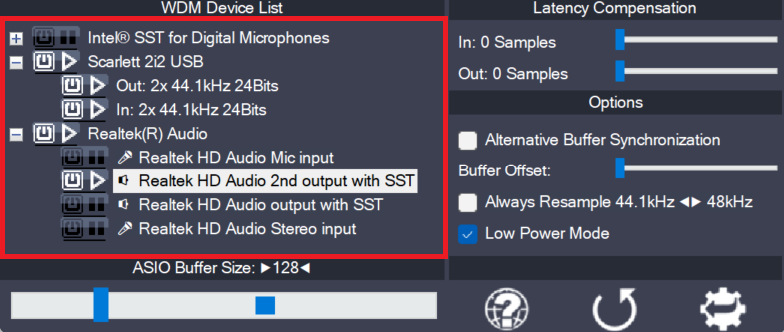
    Once the control panel has been switched to advanced mode, things begin to look a little more complicated. The device list is now expandable and you can enable more than one item at a time. The device list contains Devices, Device Interfaces and so called “Pins”. Devices are independent hardware units most of the time.

    more

  • Device aggregation

    Device aggregation

    Using the button next to each entry, you can now selectively enable/disable each particular item in the device list. This way, you can also create multi-device-setups (“aggregate devices”). Multi-device-setups require that all the devices involved are running from the same clock source. You can achieve this by daisy-chaining devices via S/PDIF etc. On-board devices usually

    more

  • Latency Compensation

    Latency Compensation

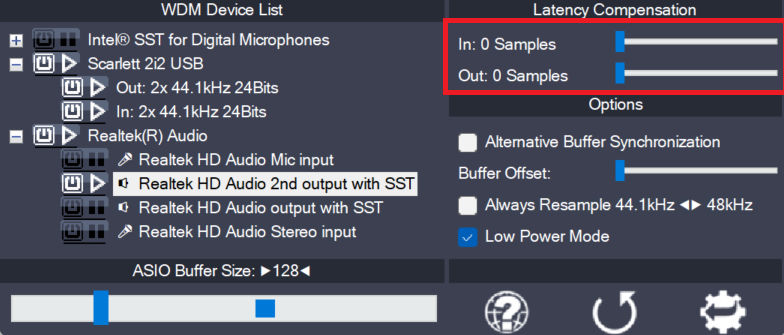
    Since ASIO4ALL does not have sufficient knowledge of the underlying hardware/driver architecture, it can only guess the actual latencies involved. With these sliders you can compensate for the latencies unknown to ASIO4ALL such that recordings in your sequencer Software are properly aligned with the rest. Note: In multi-device-setups the largest respective value of all devices

    more