
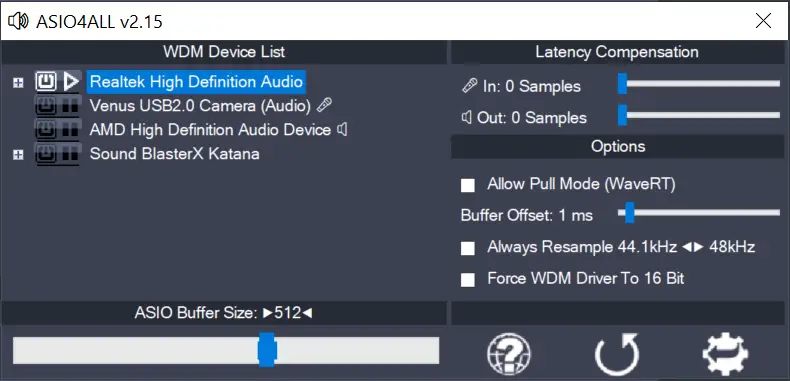
- This version officially supports Windows 10 and Windows 11.
- Also confirmed to work with Windows 7 and Windows 8, with some minor GUI visual artefacts, though.
- Report bugs to feedback@asio4all.com!
Changes since version 2.15 (Beta 3):
- Workaround for Oculus VAD.
- Fix crash with Blackmagic Design DeckLink driver.
- Avoid using “Stereo Mix” input in default configuration.
- Fix erratic behaviour of “Force 16 bit” – option, especially when WDM driver does not support a 16 bit sample data format.
Comments
57 responses to “Finally – Version 2.15 (final!)”
I have a Presonus Studio 24c as input for my guitar and Realtek S1220A onboard sound card as my output.
My problem is that everything works FINE until 20-30 minutes that the sound starts to lag/delay. (NO cracklings noises etc… just lag/delay)
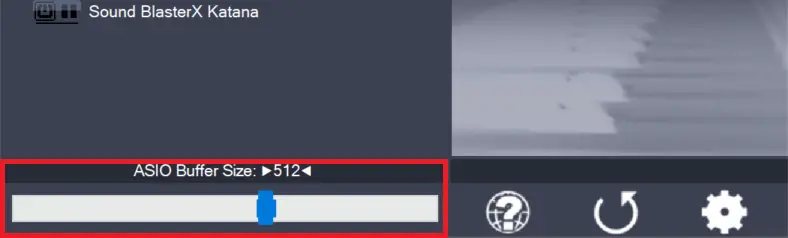
Tried Buffers from 64-1024 but nothing. Also tried to play with Latency Compensation and Buffer Offsets on both input/output devices……No luck.
On my input I have Hardware Buffer ON because without this after 20 minutes the sound starts to cracking.
My input and output has the same : 48KHz / 24bits
My system has an i7-12700K and 32GB DDR5 RAM.
Is there anything I can do?
I get an error message saying “error opening file for writing” whenever I try to install the driver. What do I do
Close any application currently using ASIO4ALL. The installer cannot overwrite files while ASIO4ALL is still running.
Very annoying website. Adverts at bottom take up 25% of the screen. Other adverts appearing all over the screen.
Hard to navigate and differentiate between proper content and adverts.
Hello, I have a Wrugste and it’s not registering at all. The manual instructed me to come to this website and install the drivers here. But when I install it doesn’t give me any options just installs and gives me a link to this website, I’ve seen videos but I don’t get shown any boxes to check off no matter how many times I try to re install
How do I send in my crash report
Enable user mode dumps, reproduce the crash event – and then send in the (mini)dump file, along with some prose.
Collecting User-Mode Dumps 🔗
ASIO4ALL makes my DAW (Ableton Live) crash every single time I try to activate it as a driver. Do not recommend.
Send in the crash dump and we shall look into it.
I am having the same issue
после загрузки появляется просто ссылка на сайт, что делать?
“Что делать?” В отличие от Ленина, нам не нужно писать целую книгу, чтобы ответить на этот вопрос.
Руководство по эксплуатации!
wtf?
After I download it, I click on the icon it just leads me to this web site. I need help. Thank you
Same problem here. Nothing in the file folder either, except a shortcut linking to this site and a couple of Dlls with no readme or instructions.
Same problem = same solution.
Navigating this site’s “Help” menu will bring you here: https://asio4all.org/help/
I have been trying to use it on Sibelius software, It is not working. It does appear but there is no sound at all. I also need help on this one.
I’ve got it working, but only on 32-bit Sibelius 7 (in Windows 11). 64-bit is silent. Not sure why, yet.
I don’t know about others, but I found the offline configuration utility useful which has disappeared as an option in this version. Anyway thanks for these drivers!
You can obtain the offline version of ASIO 2.15. First, you need to install the older version, ASIO 2.14. Then, extract the newer version, 2.15 – final. Add ‘asio4all.dll’ and ‘asio4all64.dll’ from the extracted ASIO 2.15 to the installed folder of 2.14, and run ‘A4ARegFix.exe’.
( I found the cause of the popping sound )
Hi, I represent everyone who uses asio4all, giving feedback on the popping sound and tips on how to fix it.
Before I get into the problem, I would like to tell you about the computer configuration I use, which is very powerful, but still has a state of popping sound when singing live in the paltalk chat program. Laptop MSI GE62 6QF PRO. i7, Ram 16G.
I use cubase software in combination with asio4all to sing live on paltalk chat software.but have a popping sound..
how to fix, i open asio4all, and drag the buffer Size to 768, then I close the asio4all window. and play music, the phenomenon of popping sound is still there. then I open the asio4all window and drag the Buffer Size to 640 and close the window. I no longer have the popping sound problem>
you try to find the error to fix it, and release the latest update. thanks you
what a crap website with adds. makes me not want to try. it used to be easier to download. it sucks now