Version 2.19

  • No new features, bug fixes only.
  • This version officially supports Windows 10 and Windows 11.
  • Also confirmed to work with Windows 7 and Windows 8, with some minor GUI visual artefacts, though.
  • Report bugs to feedback@asio4all.com!

Changes since version 2.18

  • Fix aggregation issue when mixing WaveCyclic output and WaveRT polled input devices, resulting in input signal distortion.
  • Fix sporadic host reset loop in Studio One (and may be other hosts, too).
  • Remove PnP ID from device tooltip window, thus cleaning up the GUI somewhat.
  • Fix detection of Bluetooth device connect/disconnect status. This would have resulted in some connected devices disappearing and some disconnected ones visible.
  • Fix minor resource leak across host reset requests.
  • Some minor tweaks to WaveRT buffer handling.


Posted

in

,

by

Tags:

Comments

10 responses to “Version 2.19”

  1. version 2.18/2.19 is an improvement on2.17 which broken my set up. thanks for the improvements.

  2. I found a new bug in ASIO4ALL. When using “Studio One“ in WaveRT device mode, requesting the buffer size fails.
    Could you please look into this issue? Thank you very much.
    Best regards 🙂

    1. Try using ASIO4ALL UI (User Interface) was a bug since 2.17 .

  3. For some reason, 2.19 [Final] doesn’t work for many people, it produces no sound at all. However, 2.19_Test (which was linked in your 2.18 post: https://asio4all.org/downloads/ASIO4ALL_2_19_Test.exe ) works very well. I’m using Realtek Audio; WASAPI and Steinberg Built-in both work fine.

    1. Michael Tippach Avatar
      Michael Tippach

      Try to set the ASIO buffer size to >= 15ms, as an experiment. Does this make a difference?

      1. Yes, works for me under this config:

        ASIO Buffer Size: 768 spls (16/21 ms)
        Low Power Mode: Off
        Input: disabled
        Output: headphones only
        Latency Compensation (in/out): 16 samples
        Sample Rate: 48 kHz
        DAW: Reaper 7.69 (Apr 2026)
        OS: Windows 11 Home 25H2 (Apr 2026)
        Audio drivers: Realtek 6.0.9915.1 (Nov 17, 2025)

        1. Have you been able to pick any ASIO buffet size less than 10ms on previous versions?

          1. Only with 2.19_Test and 2.16

  4. Thank you for your great work on ASIO4ALL!
    In v2.19 you fixed:
    “Fix aggregation issue when mixing WaveCyclic output and WaveRT polled input devices, resulting in input signal distortion.”
    But the reverse combination still has the same bug:
    Input: WaveCyclic (USB 1.1 audio device)
    Output: WaveRT polled (onboard Realtek audio)
    Symptoms:
    Audio buffer drift over time
    Increasing output delay
    Output signal distortion, crackling, static noise
    This is the same clock drift/sync issue, just on output instead of input.
    Is this the issue that the previously mentioned buffer drift compensation was meant to address?
    Could you please fix this reverse case in a future version?
    Many users with USB 1.1 inputs have this problem for years.
    Thank you! 🙂

    1. Michael Tippach Avatar
      Michael Tippach

      Clock drift correction is not yet implemented. The sample rate display feature currently only helps to find out whether clock drift might/might not be an issue with individual devices.

Leave a Reply to Michael Tippach Cancel reply

Your email address will not be published. Required fields are marked *

This site uses Akismet to reduce spam. Learn how your comment data is processed.

Copyright © Michael Tippach

Imprint | Privacy

Powered by WordPress

ASIO is a trademark of Steinberg Media Technologies GmbH.  All other trademarks are the property of their respective owners, used for product identification purposes only.

  • Advanced configuration

    Advanced configuration

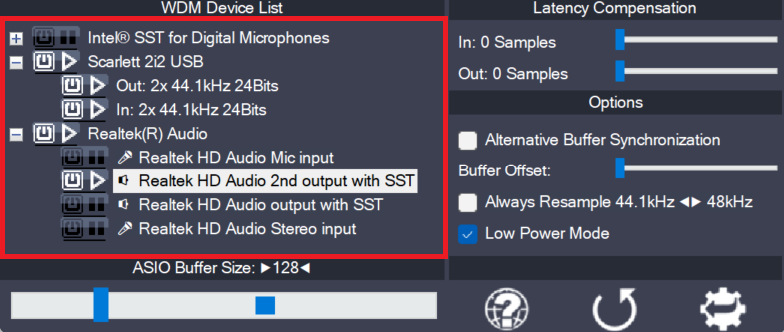
    Once the control panel has been switched to advanced mode, things begin to look a little more complicated. The device list is now expandable and you can enable more than one item at a time. The device list contains Devices, Device Interfaces and so called “Pins”. Devices are independent hardware units most of the time.

    more

  • Device aggregation

    Device aggregation

    Using the button next to each entry, you can now selectively enable/disable each particular item in the device list. This way, you can also create multi-device-setups (“aggregate devices”). Multi-device-setups require that all the devices involved are running from the same clock source. You can achieve this by daisy-chaining devices via S/PDIF etc. On-board devices usually

    more

  • Latency Compensation

    Latency Compensation

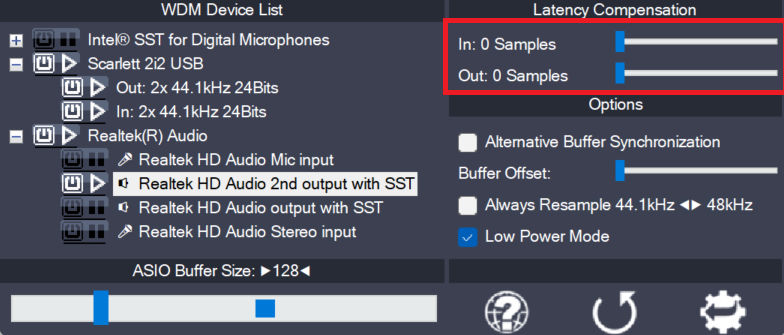
    Since ASIO4ALL does not have sufficient knowledge of the underlying hardware/driver architecture, it can only guess the actual latencies involved. With these sliders you can compensate for the latencies unknown to ASIO4ALL such that recordings in your sequencer Software are properly aligned with the rest. Note: In multi-device-setups the largest respective value of all devices

    more