
Version 2.17

  • This version officially supports Windows 10 and Windows 11.
  • Also confirmed to work with Windows 7 and Windows 8, with some minor GUI visual artefacts, though.
  • Report bugs to feedback@asio4all.com!

Changes since version 2.17 Beta 2:

  • Squeeze another millisecond out of USB 1 audio device latency
  • Completely remove the legacy “Use hardware buffer” – option, along with the selection of 3 or 4 KS buffers. This is >20 years old stuff and does not serve any meaningful purpose on modern systems.
  • Fix an issue where some audio inputs would not show up
  • Lower CPU utilization also in Wavert polling mode when “Low Power Mode” option is enabled
  • Improve input/output latency reporting
  • The installer now has a “Debug” option. When selected, a debug handler will be added, catching application errors instead of just silently crashing to desktop.
  • Minor fixes for improved stability and performance


Posted

in

,

by

Tags:

Comments

22 responses to “Version 2.17”

  1. Kimberly Avatar
    Kimberly

    Hello All,
    I am not tech savvy but I am attempting to Download the latest version, however I’m receiving a prompt to download another browser on my computer
    Is this acceptable. I do not want to download any third part software.

    1. Try to not click on ads when your intent was to not click on ads. They are clearly marked as ads.

Copyright © Michael Tippach

Imprint | Privacy

Powered by WordPress

ASIO is a trademark of Steinberg Media Technologies GmbH.  All other trademarks are the property of their respective owners, used for product identification purposes only.

  • Advanced configuration

    Advanced configuration

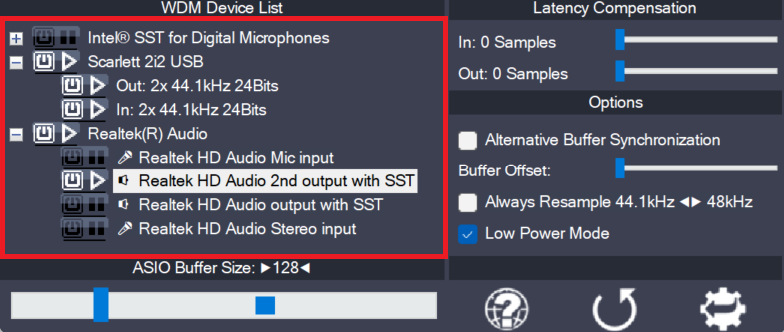
    Once the control panel has been switched to advanced mode, things begin to look a little more complicated. The device list is now expandable and you can enable more than one item at a time. The device list contains Devices, Device Interfaces and so called “Pins”. Devices are independent hardware units most of the time.…

    more

  • Device aggregation

    Device aggregation

    Using the button next to each entry, you can now selectively enable/disable each particular item in the device list. This way, you can also create multi-device-setups (“aggregate devices”). Multi-device-setups require that all the devices involved are running from the same clock source. You can achieve this by daisy-chaining devices via S/PDIF etc. On-board devices usually…

    more

  • Latency Compensation

    Latency Compensation

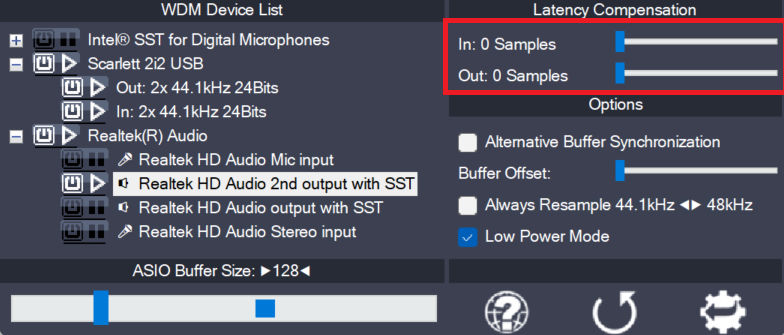
    Since ASIO4ALL does not have sufficient knowledge of the underlying hardware/driver architecture, it can only guess the actual latencies involved. With these sliders you can compensate for the latencies unknown to ASIO4ALL such that recordings in your sequencer Software are properly aligned with the rest. Note: In multi-device-setups the largest respective value of all devices…

    more