
New hosting provider, site re-built from scratch, clutter removed, new layout (resembling the pre-2021 design). Added user comment function.

Site re-launch
by
Tags:
Comments
56 responses to “Site re-launch”
-
Thanks very much for your continued support of the software; it helps a lot.
However, the site is horrible and is laid-out poorly. Orange text on a grey background is illegible… and in a given browser window, there are at least 8 ‘regions’ that are saying ‘Download’ and the REAL download link, while in the middle of the window, is not distinctly different from all the popups and frames with even more ‘Download’ links.
A backward move, IMO.
-
Charge $5 per download and lose the ads.
I cant figure out where the proper download is located. I would much rather pay a reasonable fee than deal with this. -
I can understand if sites finance themselves partly through advertising. But this is too much. And it will probably not create a lot of revenue because the site is almost unusable without an ad blocker. Less is more…
-
This website look was created on a budget. Not everyone can afford a luxury. I can only say that beauty is in the eye of the beholder.
Black is black, but a light colour GUI is more pleasant to the eye (at least for me).
-
На белом интерфейсе серый текст, шрифт не виден. Такие сайты отбрасываю, что бы не напрягать зрение и нервы.
-
-
Whoever redesigned this site, needs to not be designing websites. More ads than ever.
-
Yo no kidding. I don’t know if I can even trust these downloads. Just wanted ASIO4all and it’s like trying to get a free game from the early 2000s
-
yo you need to understand that this is a free website and created on a budget you should thank the dev team for this
-
-
How do I open ASIO4ALL so I can modify its settings. When I downloaded and installed it, all it gave me was a link to this website, NOT an exec file to open the settings. HELP!
-
Cierto, me pasa lo mismo.
-
-
You call this piece of shit a website? I get that you want to make money, but this is a f*cking joke. This website is plain hostile towards any user and I am taking offense. I love that you wrote the tool, but now you’re just being a sad leech.
Very little respect for this. -
estou utilizando o superior drummer mas o Asio não esta transmitindo o áudio para os fones em vez disso utiliza os auto falantes do notebook o que posso fazer? já fiz a alteração nas configurações do notebook para reproduzir nos fones e desabilitei o áudio dos auto falantes mas mesmo assim ainda é reproduzido errado
-
Irmão, o Asio4All tem um painel proprio aonde você seleciona qual será a saida de audio, bem fácil de achar, qualquer coisa da um toque
-
-
Midex GLX-4000 ses kartı kullanıyorum. 4 giriş kanalı bulunmakta fakat sadece L ve R olarak iki kanalı görüyor asio4all. Çözüm için lütfen yardım.
-
Dear author, please, release version 2.16 as soon as possible. It works perfectly with Windows 11 and Cubase13.
(version 2.15 did not open the control panel in Cubase…) -
Asio4All shutsdown when clicking on it. Using FLStudio 21
Trying to record but it just crashes. Need help.-
An issue has been identified which potentially could be causing this under certain conditions. Please try:
https://asio4all.org/downloads/ASIO4ALL_2_16_TRACE.exe and report back!-
OK, So where do I get the program from instead of a link to the web site.
-
So I am running into the same issue with FL Studio 21 and version 15. I ran the trace file you sent above and it still crashes. What else can I do to get this working? It worked a week ago and now it doesn’t. I uninstalled and reinstalled version 15 (english) and it still won’t work. Please help! Thank you.
-
Would be helpful if only I could reproduce this over here. Unfortunately, to no avail so far. Please enable local crash dumps and send me the crash dump file mailto:feedback@asio4all.com.
Thanks!
How to turn on local crash dumps:
https://spitfireaudio.zendesk.com/hc/en-us/articles/11727762149661-How-to-enable-crash-dumps-on-windows
-
-
-
-
May I ask do you have plan to support native DSD?
-
Super d’avoir refais un site (je suppose que vous avez eu un conflit avec votre ancien hébergeur)
puisque vous avez la main,
en lisant les commentaires je suis étonné que certains utilisateurs n’arrivent toujours pas télécharger la dernier version d’ASIO4ALLne vous serais t’il pas possible en bas de toutes les pages
(puisque votre site est vertical)de rajouter un simple lien vers https://asio4all.org/2-15/ noté téléchargement simplement ??
Rémy
-
Wenn das Auswahlfenster vergrößert werden könnte…das wäre toll. Bei 4 ASIO-Treibern und >40 Stereo-Ein/Ausgängen ist die Gerätewahl sehr mühsam.
-
Lieber Herr Tippach,
wir nutzen seit Jahren auf einem Win 10 System Cubase Pro, nun in der V. 12, und ein RME UFX Interface in unserem Studio. Nun ist ein Digital-Mischpult, Yamaha DM3S, hinzugekommen und wir würden natürlich gern das intergrierte Interface des DM3 gleichzeitig mit dem RME nutzen wollen.
Wir haben den asio4all geladen.
Dieser zeigt aber nicht (in Cubase) die 16 Eingänge und Ausgänge des Yamaha sondern nur je 2 E/A an. (der Yamaha Treiber zeigt alle E/A’s)
Auch lässt sich das RME und das Yamaha nich gleichzeitig aktivieren.
Würden Sie uns bitte weiterhelfen, wo liegt unser (Gedanken)Fehler oder können Sie eine Vorgehensweise aufzeigen, die zum Ziel führt, oder wie würden Sie vorgehen?Sehr vielen Dank für Ihre Bemühungen !
Freundliche Grüße -
Well… if you could’ve work a little more and have a little imagination the new old version wouldn’t be so… shabby. Yes. That’s the wo… WTF!!!. NO way. I was obviosusly kidding. I love the way you did it this time. Reminds me the first time I knew the site. Looks like empty but… why should it look like full, with all the stuff at fist sight when one of the coolest thing is to find. Plus, it is not that you got thousands of items, and just knowing that the last one seems to me like… let’s see if I can make my longstirymind short (I’m Spanish, and in Spanish I could tell you in 3 lines, my thoughts but when I thought first in English it almost get me into the bed again lol. It sounded sooooo boring even in my head!!. You offer one product, then every version, and language. Of course all of the stuff with the descriptions… I’m sure that If you take these last words I’ve just said and ask for an idea yo GPT or Bing it came THIS version of the site, or very close hehe.
I really like it.
Congratulations, and, of course, THANK YOU.
Carlos E. C. -
Пожалуйста сделайте что нибудь версия 2.15 не дает нормально работать с Давинчи резолв 18. Прога просто постоянно крашится, а в статус баре Значек асио4алл с восклицательным знаком.
-
Thanks for making this program available.
Unfortunately, it does not work on my new Windows 11 PC using Sound Forge version 10.Sound forge can see the ASIO drivers but does not work with them correctly. I play a song in Sound Forge and it plays through the headphones, I stop and restart playback and it comes out the speakers, if I do it a third time I get en error message saying the driver is not installed. Then I have to reboot the PC to start again.
The version of Sound Forge is from the Windows XP era. So, it’s surprising it runs at all. But, It used to work with an M-Audio supplied ASIO driver, so I thought I would give it a try.
Thanks anyway.
-
The software download is here: https://asio4all.org/2-15/
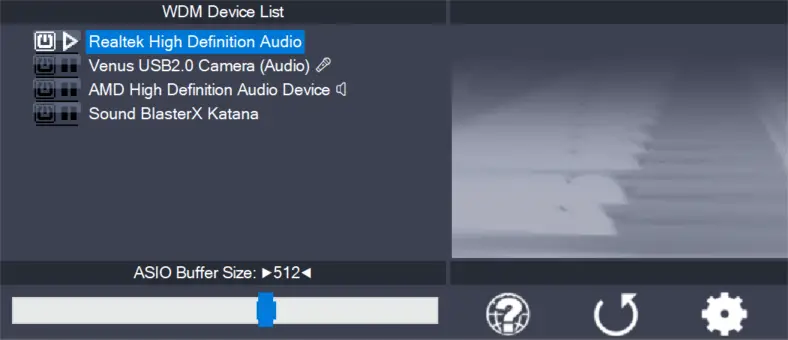
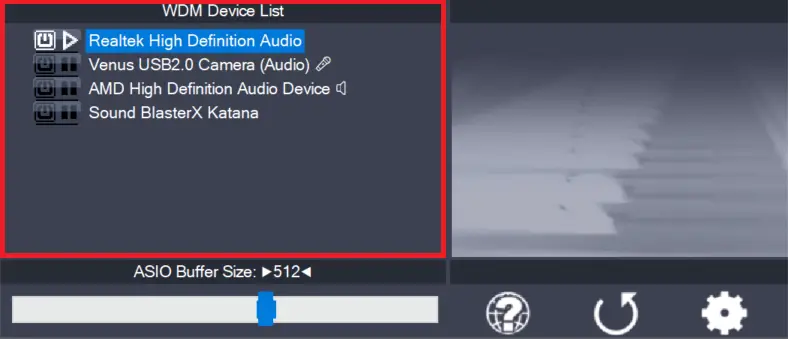
For those who only seem to be getting as far as the desktop shortcut to the website, ASIO4ALL will not appear until it is running. Open your DAW and select ASIO4ALL as your output device. A green icon will then appear in the lower right notification area of the taskbar. Click it to adjust settings, including the output you want to use.If you’re using Reaper and have ‘close device when not in use’ enabled, the icon will disappear when you try to click it (doh!). Just go back to Reaper and hit ‘play’, and then you can access ASIO4ALL’s settings. You don’t need to open a project to do this.
Hope this helps!
-
Hey all. I would to get help downloading asio4all.
-
Don’t bother, the owner/developer decided to become a major asshole and design this piece of crap to scare you away from downloading his precious little tool.
-
-
gratuito ma con carta di credito????? e cosa è questa novità?
-
Hello lovely man and world, thank you for asio4all, “You Are” doing what ms should be doing in the 1st place, may your dreams be full of unicorns and shooting stars for all your days and nights. ripley signing off.
-
Hello lovely man and world, thank you for asio4all, tour doing what ms should be doing in the 1st place, may your dreams be full of unicorns and shooting stars for all your days and nights. ripley signing off.
-
There are no tutorials up for how to install this now. All I can see everywhere is “Dri8ver Support One” I didn’t need all this stuff last time I had Asio4All working fine with my set up. I simply want it to use Helix Native vst plug in for Reaper DAW but I am having problems just getting it installed which i do not understand because I had it on my computer for Rocksmith before now its just gone and i cant get it back
-
What’s wrong with navigating “Overview->Download”?
-
CLICK ON WHAT, YOU DOLT!? THIS WEBSITE IS JUST ADS
-
-
What’s wrong with “Hello, please, if you have time, thank you”????
I could bet that the ASIO4ALL guys don’t owe you anything.
-
-
Good luck. I appreciate the work you put in but the website is a mess! Covered in spam download links unfortunately so easy to click on the wrong one…
-
Why am I unable to use outputs 3 and 4 on my Tascam 4X4 interface through ASIO4ALL?
-
Are you able to use all 4 outputs for normal Windows sounds? If yes, we need to look into that.
-
-
Keep downloading it, but every time it is just a link to this site. So how do I get the actual app / program?
-
-
Nadal pobiera link do strony zamiast aplikacje. To frustrujące
-
-
-
-
Every time i download it, it can’t work. When I click the icon it just lead me to this web site.
-
-
Glad to hear the good news 🙂
For the longest time I wanted to ask you a question.
Would it makes sense to have a new ASIO 4 all version in which you can completely disable detection of certain audio devices to speed up app loading?
I have so many devices I feel ASIO4all is taking time to open FL Studio with my already set device.
I need to have as many devices cause I’m a VR developer in the audio field.
-
Hi Michael Tippache, I am from China, I have a tricky problem now, my previous computer configuration was Intel i5-9400, graphics card HD630, everything was fine, after I changed the computer with Intel 11th generation 11700 , The graphics card is hd750. AVR has no sound output under aso4all. My AVR is stormaduio isp core 16. Switching to JAVA, I suspect that ASIO4all is not compatible with 11th Gen Intel. Re-upgrading REW to 5.20.14 doesn’t work either.
-
Can we purshase or support your work?
-
Yeah! I don’t mind paying a few bucks for this. But it seems Michael has decided to keep it “free” by making this website almost impossible to use with a million ads.
Oh, and Michael, your tool doesn’t install properly on Win10 anymore.
Ah well, it was fun while it lasted and I do have to thank you for having used this quite a bit in the past. Just a little sad that the good times are over.
-
-
李总,您好:
我们在使用ASIO模式(ASIO4ALL v2.13)播放音乐时,音频数据频繁出现噪点(人耳听不出来,但抓数据能看出异常),而且长时间播放音乐会出现噪音,大面积的异常数据,请问这个问题是如何造成的?有解决方案吗?非常期待您的答复。
Dear Li,
When we use ASIO mode (ASIO4ALL v2.13) to play music, the audio data frequently experiences noise (which cannot be heard by the human ear, but anomalies can be detected by grasping the data), and there is noise and a large area of abnormal data when playing music for a long time. How is this problem caused? Is there a solution? Looking forward to your reply very much. -
Thanks ever so much Michael for all of your hard work. The ASIO drivers that came with my ASUS Xonar soundcard were too buggy to use reliably, whereas yours work like a charm.
-
前来庆贺,祝愿新的网站项目早日竣工。
Hey, buddy; Wish you a speedy completion of your new website project,And develop more great new works. -
Cubase 2.9舊版
宏碁w10可用
2.5新版Lenovo IdeaPad Slim 3i
w11常出錯 ?? -
You lazy bastard finally did it!
-
me parece muy buena app para nuevos talentos musicals
-


Leave a Reply to Quinclyn Birris Cancel reply