
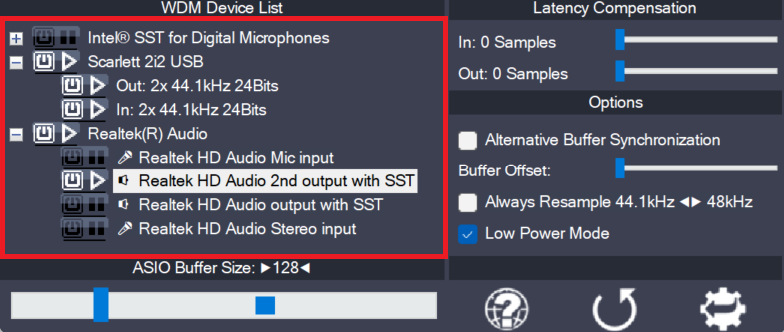
Using the button next to each entry, you can now selectively enable/disable each particular item in the device list. This way, you can also create multi-device-setups (“aggregate devices”).
Multi-device-setups require that all the devices involved are running from the same clock source. You can achieve this by daisy-chaining devices via S/PDIF etc. On-board devices usually share a common clock source.
The accuracy of audio device clocks is measured in PPM (Parts Per Million).
How PPM Affects Your Audio:
- Clock Drift: Whenever two clocks are not identical, devices will slowly drift apart. A 100 PPM difference means two recordings will diverge by 360ms every hour.
- Buffer Errors: If one device is slightly faster than the other, the audio buffers will eventually overflow or underflow, causing audible clicks, pops, or dropouts.
Quality Tiers:
| Consumer/Standard: | ±50 to ±100 PPM |
| Pro Audio Interfaces: | ±10 to ±25 PPM |
| Master Clocks: | <1 PPM |
Note: If devices are not accurately synchronized, their audio streams are likely to drift apart over time. This may take minutes, sometimes hours, until there are audible artefacts.
USB 1 audio devices come in three flavors:
- Synchronous
- Asynchronous
- Adaptive
Only synchronous devices will adjust their audio clock to the USB clock of the computer and hence are likely to have no problems working together with other devices in the same setup. Ironically, these will be the cheapest devices on the market, as they use chips that do not even need a crystal for audio clocking.
Here is how to obtain this information for any USB 1 audio device:
- Download the free “usbtreeview” from the Web site of the author: https://www.uwe-sieber.de/usbtreeview_e.html.
- Extract the archive and run the tool (no installation required)
- Find your USB device and parse the descriptor information as shown below…
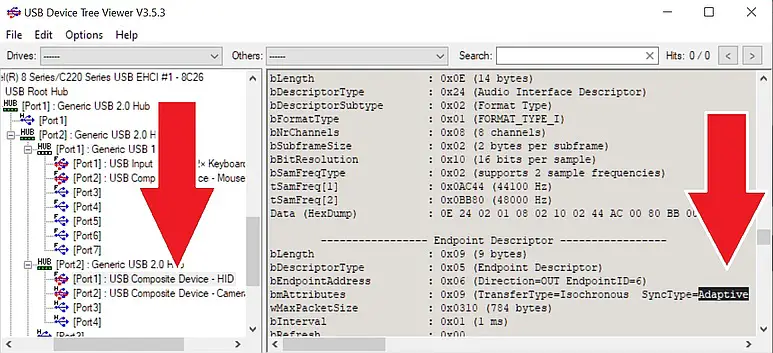 |
USB 1 Audio Device
For USB audio class 2 devices, this is a little different. The important detail is bit 1 in “bmControls“, telling us that the device can be programmed to follow the USB host clock (isochronous mode).
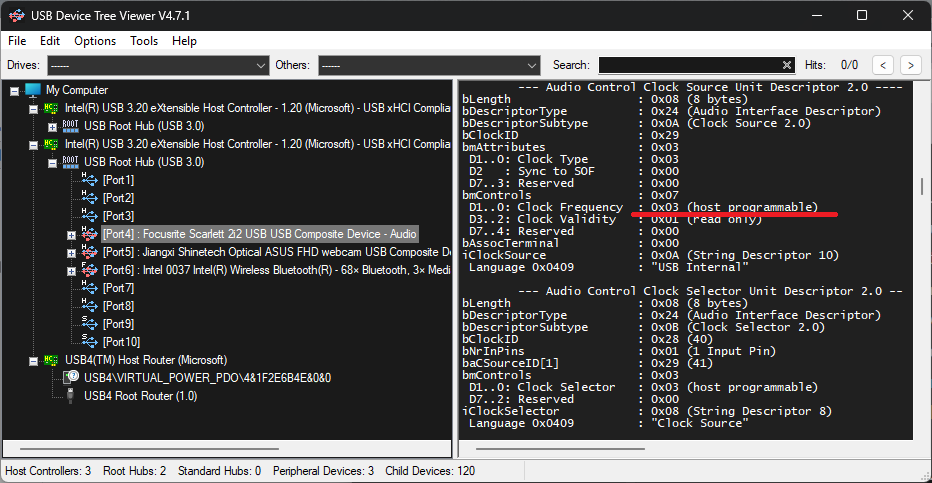 |
USB 2 Audio Device
A value of “3” in that place means that the device can do either: run on its own internal clock or follow the USB host controller clock.
Ultimately, the clocking mode here is decided by the Windows USB audio driver.
I found that, lately, usbaudio2.sys – the Windows UAC2 device driver – apparently sometimes synchronizes the device clock to the host controller clock – in turn making it possible to aggregate multiple USB 2 audio devices using ASIO4ALL – without having to worry about audio clock drift!
Future versions of ASIO4ALL wil also measure and display the actual sample rates of individual devices. Like so:
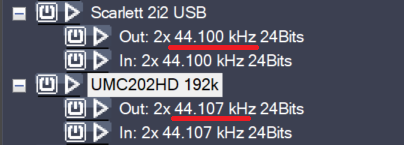
This is a real screen shot – and it shows that the above two devices will have problems when aggregated – even though they are rather similar boxes, comparably featured – and their clock descriptors look identical.
The Scarlett runs pretty close – if not equal – to the system clock (= the reference clock). The UMC202HD, however, is off by 7Hz, i.e. 160 ppm. Even with clock drift compensation (coming up soon), there is no possible setup where the signal of at least one of these two devices will remain unaltered.
Sample rates are relative to the internal system clock of your computer. On board audio devices thus will always have a reading of close to exactly 44.100, 48.000, …
Personally, I recently ran two UMC 1820 in parallel through ASIO4ALL, for about an entire day, without the slightest hickup. I seem to remember that this was not possible with usbaudio2.sys, 2 or 3 years ago. I might be wrong, though…