Version 2.19

  • No new features, bug fixes only.
  • This version officially supports Windows 10 and Windows 11.
  • Also confirmed to work with Windows 7 and Windows 8, with some minor GUI visual artefacts, though.
  • Report bugs to feedback@asio4all.com!

Changes since version 2.18

  • Fix aggregation issue when mixing WaveCyclic output and WaveRT polled input devices, resulting in input signal distortion.
  • Fix sporadic host reset loop in Studio One (and may be other hosts, too).
  • Remove PnP ID from device tooltip window, thus cleaning up the GUI somewhat.
  • Fix detection of Bluetooth device connect/disconnect status. This would have resulted in some connected devices disappearing and some disconnected ones visible.
  • Fix minor resource leak across host reset requests.
  • Some minor tweaks to WaveRT buffer handling.


Posted

in

,

by

Tags:

Comments

36 responses to “Version 2.19”

  1. version 2.18/2.19 is an improvement on2.17 which broken my set up. thanks for the improvements.

  2. I found a new bug in ASIO4ALL. When using “Studio One“ in WaveRT device mode, requesting the buffer size fails.
    Could you please look into this issue? Thank you very much.
    Best regards 🙂

    1. Try using ASIO4ALL UI (User Interface) was a bug since 2.17 .

    2. Letting the host override the ASIO buffer size is a design artifact from long ago. There will always be a chicken-and-egg problem with this approach.

      ASIO buffer size can *always* be set inside the ASIO4ALL control panel.
      We shall remove the option for the host to override. There simply is no practical benefit – and it is confusing and error prone – q.e.d.

      1. This issue never existed before; it has only just appeared now. I’m just bringing this to your attention to ask if it can be fixed, not arguing with you about what came first—the chicken or the egg. Everyone has always assumed that the chicken came before the egg, and this conclusion was already established previously. Right now we shouldn’t be debating right or wrong; the problem has occurred, and I’d like to ask for your help to resolve it.
        Even though I think you’re right, bringing up this kind of chicken-or-egg dilemma just feels like you’re showing off, you know? I only brought this up to you because I consider you someone I can trust. Otherwise, I wouldn’t have said anything at all.

        1. With all due respect, you have it the wrong way around!

          The first chicken (neccessarily) came from an egg, laid by some not-yet-quite-a-chicken (not neccessarily fully qualifying as “chicken”, yet).

          Hence the egg was first.

          As far as ASIO buffer size, the mechanism is as follows:
          1.) Driver reports its preferred buffer size to the host
          2.) Host calls “CreateBuffers()”, with a buffer size argument that is either equal to the driver preferred value , or something different entirely

          So there is nothing keeping Studio One from ignoring the driver preferred buffer size and setting its own, instead. Nothing!

          But it doesn’t. Rather it sort of expects the driver to change its (the drivers) own preferences, too, the next time the host calls GetBufferSize(). If the driver did not change its mind, stubbornly returning its own preferred size (which is just a suggestion), Studio One will sulk and ignore the buffer size override from within its own audio setting dialog – for no reason at all.

          So here you have your chicken-egg loop.

          Sure, we could just add a mechanism allowing the driver re-claim control over its own preferences, whenever the user touches the ASIO buffer size inside the ASIO control panel. Adding some unneccessary complexity for a solution that works only 90% of the time.

          The test build has this: https://asio4all.org/downloads/ASIO4ALL_2_20_test.exe

          – or we could just tell the host that it must go along with the driver defined buffer size (through setting max=min=preferred) and thus completely avoid any form of ambiguity.

      2. Standard ASIO drivers allow the host application to change the sample rate. I’m not judging whether this is right or wrong; it’s just common practice. I’m only raising this as a point of discussion, not arguing with you about right or wrong. Even though I think you are correct, I am simply bringing up the issue

      3. You could even add a switch to let users choose whether to allow the host to change the sample rate or not, instead of going into this whole chicken-or-egg argument with me.

  3. For some reason, 2.19 [Final] doesn’t work for many people, it produces no sound at all. However, 2.19_Test (which was linked in your 2.18 post: https://asio4all.org/downloads/ASIO4ALL_2_19_Test.exe ) works very well. I’m using Realtek Audio; WASAPI and Steinberg Built-in both work fine.

    1. Michael Tippach Avatar
      Michael Tippach

      Try to set the ASIO buffer size to >= 15ms, as an experiment. Does this make a difference?

      1. Yes, works for me under this config:

        ASIO Buffer Size: 768 spls (16/21 ms)
        Low Power Mode: Off
        Input: disabled
        Output: headphones only
        Latency Compensation (in/out): 16 samples
        Sample Rate: 48 kHz
        DAW: Reaper 7.69 (Apr 2026)
        OS: Windows 11 Home 25H2 (Apr 2026)
        Audio drivers: Realtek 6.0.9915.1 (Nov 17, 2025)

        1. Have you been able to pick any ASIO buffet size less than 10ms on previous versions?

          1. Only with 2.19_Test and 2.16

        2. New experiment: https://asio4all.org/downloads/ASIO4ALL_2_20_TRACE.exe
          This is a debug build and it will generate a file “ASIO4ALL Debug Log.txt” on your desktop.

          The most interesting lines in there:

          [INFO] Checking Buffer Size Range…
          [INFO] Block Size Range (Spls) MIN =
          [INFO] Block Size Range (Spls) MAX =

          Can you find these?

          1. Yes. Here are your results:

            [INFO] Checking Buffer Size Range…
            [INFO] Block Size Range (Spls) MIN = 256
            [INFO] Block Size Range (Spls) MAX = 96000

            Thank you in advance for your time to improve ASIO4ALL.

        3. Michael Tippach Avatar
          Michael Tippach

          So this debug version should work for you – also at buffer sizes < 512 samples. Right?

          1. Tried testing with the debug build ( https://asio4all.org/downloads/ASIO4ALL_2_20_TRACE.exe ) but it’s a no-go. Normal ASIO (ASIO + Debug + Offline Settings) checks out fine, however the TRACE build crashes Reaper 7.69 almost immediately after load, fast enough that the “ASIO4ALL Debug Log” .txt file drops on the desktop right after the crash.
            —Test Setup: Reaper 7.69 with VSL piano (VST3i) + iamreverb 1.4.3 (VST3) + Pro-Q4 (VST3)+ Then more pressure with: 2nd track with Kontakt 8.9 (every VST3/i updated to April 2026)
            Requested sample rate: 48 kHz, no input, 1 output

            Version Comparison (same base config across all)
            2.16 Default settings. 512 samples → 10/11 ms latency (12 ms with 16 sample compensation). No artifacts. Under heavier VST load, needs 640 samples → 14/14 ms.
            2.17 Default settings, Low Power Mode off. 512 samples → 10/11 ms. No artifacts. Under heavier load, needs 576 samples → 13/23 ms.
            2.18 Default settings, Low Power Mode off. 512 samples → 10/11 ms. No artifacts. Under heavier load, needs 576 samples → 12/21 ms.
            2.19 Default settings, Low Power Mode off. Only works at 768 samples → 16/21 ms. No artifacts. Buffer is already so high that adding more VSTs doesn’t force me to push it further, Reaper doesn’t even flinch.
            2.19_Test The Winner
            Default settings, Low Power Mode off. Runs clean at 512 samples → 10/11 ms. No artifacts. Here’s the kicker: under heavy VST load it stays at 512 samples → 10/11 ms. No buffer bump needed. This is the only build that holds low latency AND low resource consumption under pressure.

          2. Second Reply:
            After further testing with 2.16 (June 2024), even though it’s not really relevant in 2026 anymore, I got these results on Lenovo’s Realtek drivers 6.0.9915.1 (Nov 2025) and Windows 11 Home 25H2 (April 2026): my setup can’t handle anything below 512 samples, and most values above it throw artifacts under heavy load. Only 512 and 768 samples run clean. Everything in between chokes.

            As I said before your version 2.19_Test (The best):
            Default settings, Low Power Mode off. Runs clean at 512 samples → 10/11 ms. No artifacts. Here’s the kicker: under heavy VST load it stays at 512 samples → 10/11 ms. No buffer bump needed. This is the only build that holds low latency AND low resource consumption under pressure.

        4. If we figure out why the debug build crashes Reaper, there is a fair chance that you will be able to dial the ASIO buffer all the way down to 64 samples in the future.

          Is this an AMD system and the audio driver “Realtek (xyz) with HAP”?

          1. Yes, CPU: AMD Ryzen 5 5500U (UEFI: March 19, 2025, SMU Firmware Rev. 55.93.0)
            AMD Chipset Drivers: 8.02.18.557 (March 2026)
            OS: Windows 11 Home 25H2 (April 2026)
            Audio Hardware: Realtek: HDAUDIO\FUNC_01&VEN_10EC&DEV_0257&SUBSYS_17AA38BC&REV_1000
            Audio Driver: Realtek 6.0.9915.1 (Nov 17, 2025) / hdxacplv.inf

          2. Update: got 2.20 working with Reaper 7.69. The trick: uninstall ASIO4ALL, launch Reaper, switch the audio backend to WASAPI, close Reaper, then reinstall and configure ASIO4ALL 2.20. After that, it loads fine.
            Now for the tradeoff vs. 2.19 (Final): in 2.20 my minimum working buffer size is 576 samples → 12/21 ms latency. Higher than I’d like, but the good news is zero artifacts.
            Unrelated bonus: ASIO4ALL now plays nice with Foobar2000 2.26 and AIMP 6 (ASIO + VST2/3). Running IEMs measured on a B&K 5128 with a Diffused Field (5128) EQ target, and AIMP sounds noticeably better than Foobar. Yes, there’s latency, but ASIO4ALL paired with a parametric EQ like FabFilter Pro-Q 4 (4.12) is a game changer if you want to enjoy a playlist without firing up a full DAW.

        5. The crashing still sounds weird, though.

          Here’s a test version without traces. Please enable the “Debug” option during installation! This way, it will hopefully create a crash dump, should we run into this again.

          https://www.asio4all.org/downloads/ASIO4ALL_2_20_test.exe – Test version without log.

          Still interesting why you shouldn’t get a better performance when lowering ASIO buffer size. With ASIO buffer less or equal 512, do you get audio – albeit with occasional dropouts – or no audio at all?

          https://www.asio4all.org/downloads/ASIO4ALL_2_20_TRACE.exe – Updated trace version.

          Set ASIO buffer size to e.g. 320 samples and inspect the trace for the lines that read like:
          [INFO] Set SPL Buffer for <192 <=512 >512 (samples) MIN = 256 | MIN*2 = 256 | MAX = 480
          [INFO] SPL Init | Small packet buffer size = 1000 | pin = 2BC

          Occasional drop outs are an indication that your system is suffering hard from real time suitability issues, which are fixable through configuration changes, most of the time. Like, e.g. you *did* disable presence detection, etc. ?

          1. I sent an email to feedback@asio4all.com with my analysis of the situation and workarounds, and Attachments: CRA4D43.tmp (crash dump) & ASIO4ALL debug log.

            With 2.20_Trace Setting ASIO buffer size to 512 samples, under the value you asked in the debug log “[INFO] Set SPL Buffer for <192 512 (samples) MIN = 256 | MIN*2 = 256 | MAX = 480”

            [INFO] SPL Init | Small packet buffer size = 800 | pin = 65C
            [INFO] SPL Init | Small packet buffer size = 800 | pin = 668
            [INFO] SPL Init | Small packet buffer size = 800 | pin = 694
            [INFO] SPL Init | Small packet buffer size = 800 | pin = 2F4

            Etc.

            NOTE: No dropouts were observed on any version from 2.16 through 2.20. The only builds forcing elevated latency without artifacts are 2.19 Final (768 samples) and 2.20_Test/Trace (576 samples), at 512 samples, no audio output is produced. Additionally, 2.20 demonstrates abnormal memory behavior indicative of a leak.

            Thank you in advance.

        6. Checked myself: If you uninstall ASIO4ALL, Reaper will simply pick the next ASIO driver in the list. If that one’s buggy, Reaper will crash – without ASIO4ALL even installed. Looks like a Reaper problem.

          I have updated the test builds (both with and without log). Please use the links above.

          Memory problem should be gone. So should the crash.

          The interesting experiment: What happens now, if you dial an ASIO buffer size down to 192 samples? And: what happens if you go below 192 samples?

          1. Good news. No crash, and I can now upgrade cleanly between builds (e.g., 2.20_Test to 2.20_Trace). Worth noting: I have Steinberg Built-in 1.0.9 configured as a backup driver. The previous version crashed with this setup, the current one does not.

            Results are impressive: 512 samples = 10/11 ms latency, no artifacts. New minimum producing clean audio: 192 samples = 4/11 ms, no artifacts. Below 192 samples, the driver attempts to output but only manages an occasional single crackle before going silent entirely.

            Trace build info:

            [INFO] Checking Buffer Size Range…
            [INFO] Block Size Range (Spls) MIN = 256
            [INFO] Block Size Range (Spls) MAX = 96000
            ——-
            [INFO] Set SPL Buffer for <192 512 (samples) MIN = 256 | MIN*2 = 256 | MAX = 480
            [INFO] SPL Init | Small packet buffer size = f00 | pin = 570

            Thank you.

        7. Time for a bit of “Empirical Software Engineering”!
          I have updated the test build (without log) one more time.

          Assuming that the Realtek driver on AMD systems is somewhat “special”, in that it fails to support a packet size of 256 samples, despite having advertized that it would.

          It does support 480 samples packet size, though, which is exactly 10ms.
          10ms, however, is nothing to brag about -> so let’s find out if we can go lower in steps of 1ms. We know that 4ms does not work, because that’s how it was in older builds.

          The test build will let you try all increments from 5 … 10ms through setting the ASIO buffer size like this:

          <192 – 5ms
          <256 – 6ms
          <320 – 7ms
          <384 – 8ms
          <480 – 9ms
          480 and more: 10ms

          Can you find any setting below 480 that still works?

          1. | Buffer Size (samples) | Latency (ms) / Reaper 7.69
            | 512 | 10 / 11 |
            | 480 | 10 / 11 |
            | 448 | 9.3 / 11 |
            | 416 | 8.6 / 11 |
            | 384 | 8 / 11 |
            | 352 | 7.3 / 11 |
            | 320 | 6.6 / 11 |
            | 288 | 6 / 11 |
            | 256 | 5.3 / 11 |
            | 240 | 5 / 11 |
            | 224 | 4.6 / 11 |
            | 208 | 4.3 / 11 |
            | 192 | 4 / 11 |

            Below 192 samples, no audio output is produced. The DAW volume meters still register signal activity, but nothing reaches the output.

        8. Um… just making sure you’re using the release displaying “Development Preview 2604212037” in the GUI and Reaper x64? The output latency readings do look a bit strange, otherwise.

          If you mouse over the output, what does the tooltip say: “Polling” or “SPL”?

          1. Yes, running Development Preview 2604212037 on Reaper 7.69 x64.

            1. (SPL) Low Power Mode.
            2. Alternative Buffer Synchronization (previously the “Allow Pull Mode” switch).
            3. Always Resample 44.1 kHz / 48 kHz.

            All three options were OFF.

            When hovering my mouse over my single output nothing related to: SPL or Polling appears.

            I then tested Alternative Buffer Synchronization; Results measured in Reaper 7.69 (Latency in ms):

            | Buffer Size (samples) | After (ABS [On] + LC [0/0]) | Before (without ABS and with LC) |

            | 512 | 10/10 | 10/11 |
            | 480 | 10/10 | 10/11 |
            | 384 | 8/8 | 8/11 |
            | 288 | 6/6.0 | 6/11 |
            | 240 | 5.0/5.0 | 5/11 |
            | 192 | 4.0/4.0 | 4/11 |
            Note: I could not achieve exactly 9/9.0 or 7/7.0.

            Those are the values reported by the Reaper interface. Regarding audio quality on my current hardware: sound begins to come through from 288 samples (6.0/6.0 ms), but with heavy artifacts. Only at 512 samples (10/10 ms) does the output play completely clean.

            Summary of results on my hardware, free of artifacts under high load:
            Using 512 samples only:
            Latency: 10/10 ms with Alternative Buffer Synchronization ON.
            Latency: 10/11 ms with Alternative Buffer Synchronization ON plus Latency Compensation (IN/OUT) at 16 Samples.

            It is worth noting that with Alternative Buffer Synchronization turned OFF and Latency Compensation (IN/OUT) set to 16 Samples, my hardware produces clean audio (no artifacts) under high load across the entire range, from 192 samples (4/11 ms) up to 512 samples (10/11 ms).

        9. Forget about “Alternative Buffer Synchronization” for a moment. This will likely put the device into polling mode, which is not very helpful here.

          I have put another test build here: https://asio4all.org/downloads/ASIO4ALL_2_20_test.exe (no trace log)
          https://asio4all.org/downloads/ASIO4ALL_2_20_test_TRACE.exe (with trace log)

          Timestamp in the GUI window title bar should read: 202604221115

          Fixed reporting of output latency, which should *not* remain constant when ASIO buffer size changes over a wide range.

          ASIO Buffer size / internal packet size relation as before. If you get sound at e.g. 256 ASIO buffer, please pull a trace and look for lines that read like:

          [INFO] SPL Init | Small packet buffer size = 600 | pin = 578
          [INFO] KSPROPERTY_RTAUDIO_BUFFER_WITH_NOTIFICATION | Non SPL size = 15c0 | pin = 578
          [INFO] GetRtProperty() 5 | pin = 578 | bytes returned = 16
          [INFO] Base = E9C0D00 | Size = 600 | MemBarrier = 1

          “Size” in the 1st line is the size requested, “size” in the last line is the buffer size returned. In your system, “F00” would be equal to a packet size of 10ms. Less is better.

          1. Build tested: 2604221115 (2026/04/22 11:15)

            Configuration:
            – Low Power Mode: Disabled
            – Latency Compensation (IN/OUT): 0 samples
            – Sample Rate Rrequested by REAPER 7.69 x64: 48 kHz
            – Input: None
            – Output: 1 (Realtek HD Audio output with HAP)

            Buffer size results:

            Minimum buffer size without audio artifacts: 192 samples = Latency: 4.0 ms in / 14 ms out
            Minimum buffer size with audio artifacts: 64 samples = Latency: ~1.3 ms in / 6.7 ms out

            Debug log readings:

            At 192 samples (artifact-free):

            [INFO] SPL Init | Small packet buffer size = f00 | pin = A40
            [INFO] KSPROPERTY_RTAUDIO_BUFFER_WITH_NOTIFICATION | Non SPL size = 1000 | pin = A40
            [INFO] GetRtProperty() 5 | pin = A40 | bytes returned = 16
            [INFO] Base = 910000 | Size = 1000 | MemBarrier = 0

            At 64 samples (with artifacts):

            [INFO] SPL Init | Small packet buffer size = 900 | pin = 448
            [INFO] KSPROPERTY_RTAUDIO_BUFFER_WITH_NOTIFICATION | Non SPL size = 600 | pin = 448
            [INFO] GetRtProperty() 5 | pin = 448 | bytes returned = 16
            [INFO] Base = D480000 | Size = 1000 | MemBarrier = 0

          2. Second Reply:
            I suspect there may be an incorrectly reported value in Build 2604221115 (2026/04/22 11:15).
            At 512 samples, Reaper reports 10/10 ms (In/Out). However, the buffer sizes immediately above and below return asymmetric values:

            480 samples → 10/20 ms
            512 samples → 10/10 ms
            576 samples → 12/22 ms

            I understand there are hardware limitations involved, but my question is: can the 10/10 ms reading at 512 samples in Reaper 7.69 actually be correct, given that both neighboring buffer sizes report significantly higher output latency?

        10. The 10/10 latency reporting at 512 buffer size is correct, albeit not very intuitive.

          If the ASIO buffer size exactly matches the driver packet size, we do not need any additional buffering. In your case, the minimum packet size (that actually works with this driver) is 512 samples.

          If there is no exact size match, we have to add a full packet size to the ASIO buffer duration (minus 1 sample, in theory). Not easy to wrap one’s head around that – and it’s different for input, even!

          I have created another test release for you to work with, for the time being: https://asio4all.org/downloads/ASIO4ALL_2_20_AMD_HAP.exe

          I even own at least two systems based on the same/similar hardware design and they do expose a similar behavior. Living on two continents, however, adds some logistical challenge. Will have access to these systems only after two weeks from now – may be I can solve the problem of getting it to work with 256 packet size, then.

          1. First of all, thank you for this build for AMD with HAP (Realtek). If you need to test anything with an AMD system, I’ll be glad to contribute with beta testing before the 2.20 release. I really appreciate your dedication to this ASIO project. I’ll keep checking this post from time to time to see if there’s anything else I can do to help. Talk to you later.

  4. Thank you for your great work on ASIO4ALL!
    In v2.19 you fixed:
    “Fix aggregation issue when mixing WaveCyclic output and WaveRT polled input devices, resulting in input signal distortion.”
    But the reverse combination still has the same bug:
    Input: WaveCyclic (USB 1.1 audio device)
    Output: WaveRT polled (onboard Realtek audio)
    Symptoms:
    Audio buffer drift over time
    Increasing output delay
    Output signal distortion, crackling, static noise
    This is the same clock drift/sync issue, just on output instead of input.
    Is this the issue that the previously mentioned buffer drift compensation was meant to address?
    Could you please fix this reverse case in a future version?
    Many users with USB 1.1 inputs have this problem for years.
    Thank you! 🙂

    1. Michael Tippach Avatar
      Michael Tippach

      Clock drift correction is not yet implemented. The sample rate display feature currently only helps to find out whether clock drift might/might not be an issue with individual devices.

Leave a Reply to Michael Tippach Cancel reply

Your email address will not be published. Required fields are marked *

This site uses Akismet to reduce spam. Learn how your comment data is processed.

Copyright © Michael Tippach

Imprint | Privacy

Powered by WordPress

ASIO is a trademark of Steinberg Media Technologies GmbH.  All other trademarks are the property of their respective owners, used for product identification purposes only.

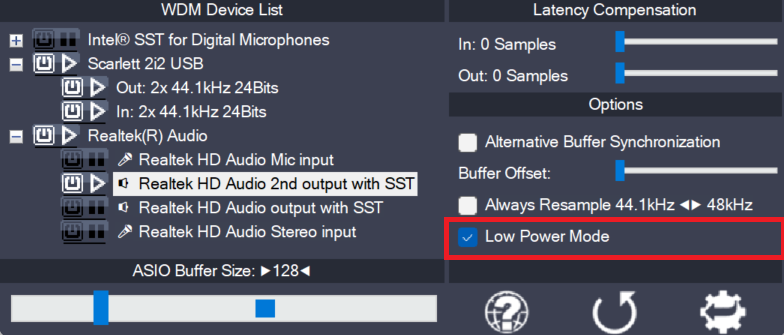
  • Low Power Mode

    Low Power Mode

    This is a global option – for the current audio host application – telling the ASIO4ALL main audio thread how to spend its idle time, i.e. the time when not calling the DAW audio processing handler. The default for this option is “enabled”, potentially lowering CPU utilization in idle mode. Depending on the current ASIO4ALL

    more

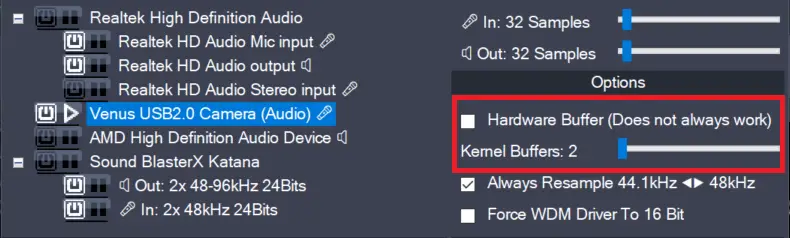
  • Hardware Buffer on/off (Obsolete)

    Hardware Buffer on/off (Obsolete)

    This feature has been removed in version 2.17!The only purpose it did serve – more than 20 years after its introduction – was to confuse users needlessly. Enables the hardware buffer for the highlighted device. This only works for so called “WavePCI” miniports, as other types of WDM drivers do not usually allow direct access

    more

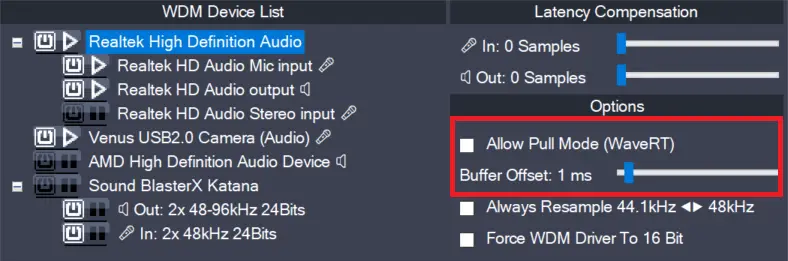
  • Allow Pull Mode (WaveRT) (obsolete)

    Allow Pull Mode (WaveRT) (obsolete)

    In version 2.17, this feature has been replaced by the “Alternative Buffer Synchronization” – option! There are two basic access methods for a WaveRT device, “pull-mode” (also called “event-mode”) and “push-mode” (also called “polling mode”). If this box is left unchecked, ASIO4ALL will not use “pull-mode”, otherwise it will use it whenever possible. The default

    more