Version 2.17 Beta 2

  • This version officially supports Windows 10 and Windows 11.
  • Also confirmed to work with Windows 7 and Windows 8, with some minor GUI visual artefacts, though.
  • Report bugs to feedback@asio4all.com!
  • The “Force WDM Driver to 16 Bit” – switch is gone. it had no real useful function anymore and most >16 bit devices do not support it anyway.

    Instead, we have a new global option called “SPL Low Power Mode”.
    What this does, when checked, is to lower the CPU usage in certain low load scenarios, allowing the processor to enter a lower power state. The backside being the impact of the exit latency from deep power states, which could lead to audio dropouts. After all, there are configurations where multiple kernel events are fired within one single millisecond – all of which need to be processed in time.

    What you should do: try, if you can enable this option with no adverse effect on audio quality. If afterwards you experience intermittent stuttering, leave this option disabled!

    Note that neither setting will increase/decrease actual CPU utilization in cases of high audio processing load. It merely determines how the main audio thread will spend its idle time.
  • Fix various potential crash sources in a number of corner case scenarios.
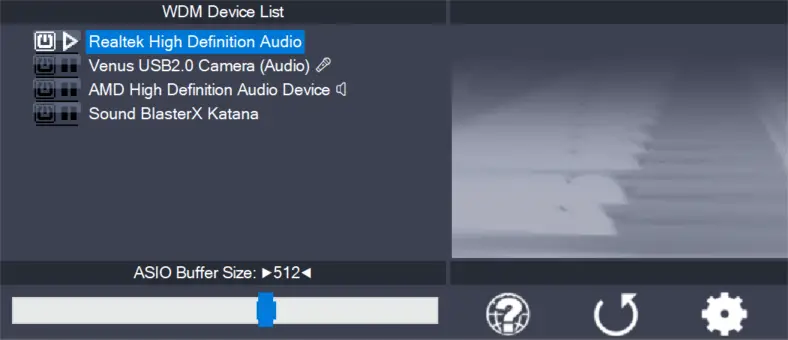
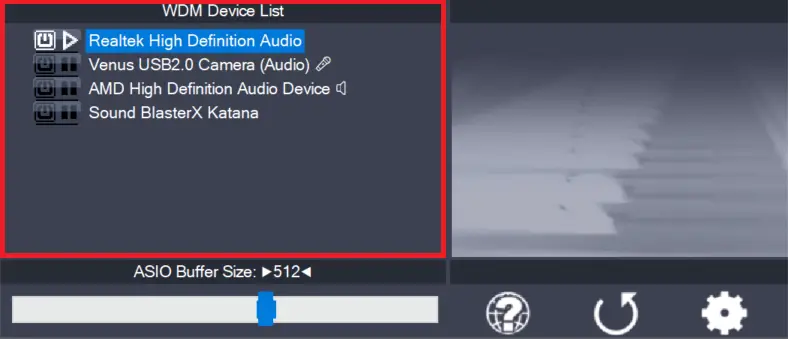
  • Fix old, annoying UI bug where device list items would not properly repond to enable/disable action, especially when the particular item is currently inactive.
  • On-board audio inputs on Lenovo Legion are working now.
  • Improve handling in case the current audio device is in use elsewhere, including by the dreaded MS GS Software Synth. Forced takeover became even more assertive.


Posted

in

,

by

Tags:

Comments

19 responses to “Version 2.17 Beta 2”

  1. Sorry to bother you again. I’ve found that starting from version 2.15+++, the CPU usage in single WaveRT mode is abnormally high. I have tested it many times, and the issue can be stably reproduced.
    I really appreciate your work and I don’t mean to be critical at all. After countless tests, the problem does exist consistently, so I hope you can look into it carefully. The CPU usage is extremely high, causing unexpected audio dropouts, glitches, and stability issues! This is especially noticeable on mid-range and low-end CPUs, both AMD and Intel platforms.
    Versions 2.13 and 2.14 work perfectly with no such issues and run very smoothly! The only reason I had to upgrade to these higher CPU usage versions is that some audio devices did not show up in ASIO4ALL in versions before 2.15.
    I suspect this might be related to some loop or conditional logic code that causes unnecessary high-load processing. Thank you so much for taking the time to check this.
    I also have another issue: when debugging for a customer, Bluetooth devices were not recognized in the device list in version 2.17, even though the Bluetooth headphones were definitely connected and working properly!
    In versions before 2.17, Bluetooth could not run at the proper sample rate — it only showed 8 kHz with distorted sound. This has been very frustrating for me.

    1. Michael Tippach Avatar
      Michael Tippach

      All connected BT audio devices should show up in the advanced control panel view.

      I have updated the preview to use somewhat less idle CPU if the “Low Power Mode” option is enabled. Still the issue remains that the mmtimer cannot be used ay more to generate wake up events.

      Microsoft have degraded the timer accuracy especially when the the audio application isn’t in foreground. May need some extra work – but I’d rather not tade in the current stability. Also, seperating the data pump from the main audio buffer is introducing some extra latency.

      Just 1 – 2 ms, but still…

  2. The new debug version you just released doesn’t crash. However, the Beta 2 version crashes every time. I’ve tested it many times and got the same result consistently.

  3. “Improve handling in case the current audio device is in use elsewhere, including by the dreaded MS GS Software Synth. Forced takeover became even more assertive.”

    Unfortunately, this infuriating issue has not been fixed. I had good hopes this was fixed right after I installed the beta driver, but the dreaded MS GS Software Synth has come back with a vengeance and there is just now way I can disable/remove it and prevent it from blocking my audio interface. No matter what internet tip I try.

    Got any advice?

    1. Michael Tippach Avatar
      Michael Tippach

      Killing the MS GS Wavetable Synth only works for the current process. The most straightforward way is to not enable it in your DAW. Also stay clear of the MIDI Mapper.

      Brute force: Kill the “audiodg.exe” process, which is the Windows Audio engine. ASIO4ALL doesn’t need that.

      1. Indeed, the issue mentioned by this friend still persists.
        I can only achieve stable performance by disabling the corresponding devices in the sound control panel list.
        This is really unfriendly for many users, as not everyone knows how to resolve this exclusive mode issue.

  4. Dennis M Wage Avatar
    Dennis M Wage

    The 32 bit dll files do not work in the beta releases.

    1. Michael Tippach Avatar
      Michael Tippach

      How did you arrive at the conclusion that they “do not work”?

  5. Hallo, ist es möglich die Yamaha MODX M Serie auch über Mehrkanal einzubinden? Zur Zeit wird nur Stereo-Input unterstützt. Oder ist dies nur bei Yamaha selbst möglich? Der Support dort ist leider mangelhaft. Ansonsten leistet ihr tolle Arbeit. LG Ed

    1. You may need to use a DAW that supports multi-channel input and output, such as Studio One.

      1. Hallo,
        Ich nochmal. Ich betreibe das ganze mit Dteinberg 15. Wenn ich Asio4all verwende werden nur die Mainausgänge angezeigt.
        Bei meinem Roland TR-8S und meinen Behringer Interfaces werden alle Kanäle angezeigt. Yamaha schrieb mir heute, dass es unter Asio4all nicht möglich ist den MODX M parallel zu anderen Interfaces zu betreiben. Gefühlt habe ich mittlerweile alles probiert

        1. Michael Tippach Avatar
          Michael Tippach

          Evtl. funktioniert der Windows USB Audio Treiber damit – statt dem Yamaha – spezifischen? Wenn MODX class compliant ist, sollten alle Kanäle angezeigt werden.

          1. Moin Michael,
            danke für den Ansatz.
            Aber leider geht das ganze dann leider nur rudimentär. Hier die Erklärung von Yamaha.
            (Natürlich ist das Problem seit min. 5 Jahren bekannt)

            Das Yamaha MODX (einschließlich MODX+ und MODX M) ist unter Windows 11 eingeschränkt class compliant, was bedeutet, dass es ohne manuelle Treiberinstallation grundlegende MIDI- und Audio-Funktionen bereitstellen kann.
            Für eine professionelle Nutzung in einer DAW (Digital Audio Workstation) unter Windows wird jedoch dringend die Verwendung des dedizierten Treibers empfohlen.
            1. Class Compliant Modus (Ohne Treiber)
            Wenn Sie das MODX einfach per USB an einen Windows 11 PC anschließen, erkennt das Betriebssystem es automatisch als Standard-Audiogerät und MIDI-Interface.

            Audio: Ermöglicht die Wiedergabe und Aufnahme des Haupt-Stereosignals (Main L/R).
            MIDI: Standard-MIDI-Kommunikation ist möglich, jedoch oft auf eine Anwendung gleichzeitig begrenzt.
            Einschränkung: Sie haben keinen Zugriff auf die spezialisierten Funktionen wie mehrere parallele Audio-Kanäle oder extrem niedrige Latenzen.

            2. Empfohlene Lösung: Yamaha Steinberg USB Driver
            Für die volle Funktionalität unter Windows 11 sollten Sie den offiziellen Yamaha Steinberg USB Driver installieren.

            Multi-Channel Audio: Ermöglicht das Senden von bis zu 10 Kanälen vom MODX zum PC und den Empfang von 4 Kanälen.
            ASIO-Unterstützung: Bietet die für Musikproduktion notwendige geringe Latenz und stabilere Performance.
            Download: Den aktuellen Treiber für Windows 11 finden Sie auf der offiziellen Yamaha Support-Seite.

            Damit ist mir bei meiner heterogenen Umgebung überhaupt nicht geholfen. Kannst Du dir vorstellen, dass ich mit Asio Link Pro und den dann jeweiligen benötigten gerouteten Asiotreibern das ganze in den Griff bekomme? Ich muss mich da noch einarbeiten und hab keine Ahnung ob das dann über Cubase 15 funktioniert.
            Lieben Gruß Eddi

  6. 1. The issue of crashes caused by USB\VID string overflow has not been fully fixed.
    2. Since version 2.16, CPU usage in WaveRT mode has been abnormally high under both idle and load conditions.

    1. 1.) Do you have means to reproduce?
      2.) Higher idle CPU load ist normal. It’s simply about how the main audio thread spends its idle time. Under 100% audio processing load, there shouldn’t be any difference.

      1. 1. On another computer with an AMD CPU: R7 5900HX, when using the same USB audio device, the software crashes.
        It does not crash when the USB audio device is unplugged.
        Also, no crash occurs after modifying the DLL to skip USB vendor/brand detection.
        2. When using DAW with version 2.14 and selecting the Realtek High Definition Audio device with WaveRT support:
        The DAW process uses 0.1–1% CPU at idle
        With plugins loaded, it uses around 5% CPU
        After upgrading to version 2.15 or later:
        Idle CPU usage jumps to 4–6%
        With the same plugins, CPU load increases to 8–10%
        PS: When using ASIO4ALL2.15+, if I select both WaveRT device and USB 1.1 device at the same time, or only select the virtual WaveRT device alone, it does not cause high CPU usage.

        1. 1.) Does this also happen with the x64 version – or only 32 bit?
          2.) Up to 2.15, WaveRT polling was using the mmtimer for generating wake up events. This was very inaccurate, to begin with – resulting in additional safety buffering time (“Buffer Offset”) and, thus, additional latency. Another issue is the exit latency for the processor when leaving a deeper sleep state. This can spoil low latency interrupt response. This also applies to event driven scenarios and this is what the SPL Low Power – switch is for. Focus is a solution that *works* out of the box and which may be improved through some additional user tweaking – not the other way around.

          1. only 32 bit

          2. Michael Tippach Avatar
            Michael Tippach

            Preview with debug option here: https://asio4all.org/downloads/ASIO4ALL_2_17.exe

            During install, make sure you check “Debug” in the installer options page!

            This will add a crash handler and put a crash dump onto your desktop, in case of an error.

Leave a Reply

Your email address will not be published. Required fields are marked *

This site uses Akismet to reduce spam. Learn how your comment data is processed.

Copyright © Michael Tippach

Imprint | Privacy

Powered by WordPress

ASIO is a trademark of Steinberg Media Technologies GmbH.  All other trademarks are the property of their respective owners, used for product identification purposes only.

  • Introduction

    Introduction

    Welcome to ASIO4ALL! This manual enables you to make the most of your ASIO4ALL installation, especially when it comes to the advanced features newly introduced in this Version of ASIO4ALL. In order to achieve the best possible results with ASIO4ALL it is recommended that your computer is configured accordingly. For updates, help and further information,

    more

  • Getting Started

    Getting Started

    Setting up your audio software In order to make use of ASIO4ALL, you need to configure your audio software accordingly. How you would do this depends on your particular software application. Generally, you would always enter the audio configuration menu and select ASIO -> ASIO4ALL v2. There now should be a button to launch the

    more

  • WDM Device List

    WDM Device List

    This is the list of audio devices found in your system. Highlight the device that you want to make changes to. Note: All parameter changes always only apply to the device currently highlighted! Activate the device you want to use by clicking on the button next to the device name! In the picture above, the

    more