
New hosting provider, site re-built from scratch, clutter removed, new layout (resembling the pre-2021 design). Added user comment function.

New hosting provider, site re-built from scratch, clutter removed, new layout (resembling the pre-2021 design). Added user comment function.
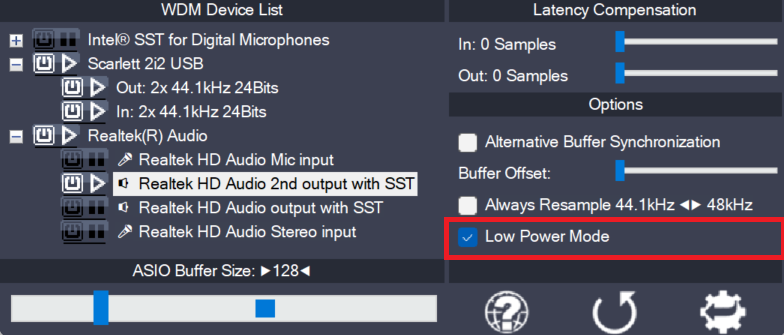
This is a global option – for the current audio host application – telling the ASIO4ALL main audio thread how to spend its idle time, i.e. the time when not calling the DAW audio processing handler. The default for this option is “enabled”, potentially lowering CPU utilization in idle mode. Depending on the current ASIO4ALL…
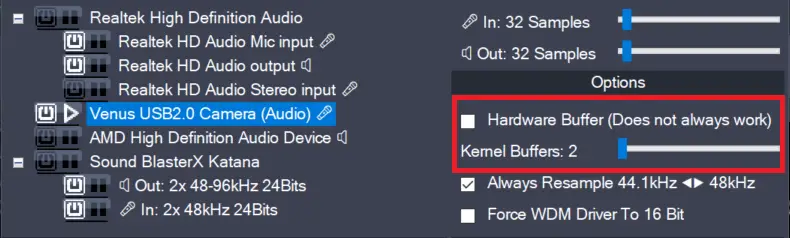
This feature has been removed in version 2.17!The only purpose it did serve – more than 20 years after its introduction – was to confuse users needlessly. Enables the hardware buffer for the highlighted device. This only works for so called “WavePCI” miniports, as other types of WDM drivers do not usually allow direct access…
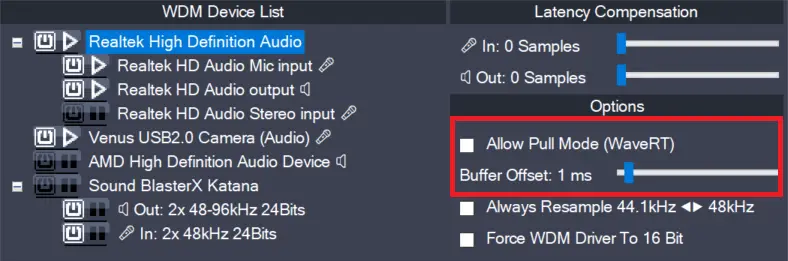
In version 2.17, this feature has been replaced by the “Alternative Buffer Synchronization” – option! There are two basic access methods for a WaveRT device, “pull-mode” (also called “event-mode”) and “push-mode” (also called “polling mode”). If this box is left unchecked, ASIO4ALL will not use “pull-mode”, otherwise it will use it whenever possible. The default…
Comments
56 responses to “Site re-launch”
You call this piece of shit a website? I get that you want to make money, but this is a f*cking joke. This website is plain hostile towards any user and I am taking offense. I love that you wrote the tool, but now you’re just being a sad leech.
Very little respect for this.
estou utilizando o superior drummer mas o Asio não esta transmitindo o áudio para os fones em vez disso utiliza os auto falantes do notebook o que posso fazer? já fiz a alteração nas configurações do notebook para reproduzir nos fones e desabilitei o áudio dos auto falantes mas mesmo assim ainda é reproduzido errado
Irmão, o Asio4All tem um painel proprio aonde você seleciona qual será a saida de audio, bem fácil de achar, qualquer coisa da um toque
Midex GLX-4000 ses kartı kullanıyorum. 4 giriş kanalı bulunmakta fakat sadece L ve R olarak iki kanalı görüyor asio4all. Çözüm için lütfen yardım.
Dear author, please, release version 2.16 as soon as possible. It works perfectly with Windows 11 and Cubase13.
(version 2.15 did not open the control panel in Cubase…)
Asio4All shutsdown when clicking on it. Using FLStudio 21
Trying to record but it just crashes. Need help.
An issue has been identified which potentially could be causing this under certain conditions. Please try:
https://asio4all.org/downloads/ASIO4ALL_2_16_TRACE.exe and report back!
OK, So where do I get the program from instead of a link to the web site.
So I am running into the same issue with FL Studio 21 and version 15. I ran the trace file you sent above and it still crashes. What else can I do to get this working? It worked a week ago and now it doesn’t. I uninstalled and reinstalled version 15 (english) and it still won’t work. Please help! Thank you.
Would be helpful if only I could reproduce this over here. Unfortunately, to no avail so far. Please enable local crash dumps and send me the crash dump file mailto:feedback@asio4all.com.
Thanks!
How to turn on local crash dumps:
https://spitfireaudio.zendesk.com/hc/en-us/articles/11727762149661-How-to-enable-crash-dumps-on-windows
May I ask do you have plan to support native DSD?
Super d’avoir refais un site (je suppose que vous avez eu un conflit avec votre ancien hébergeur)
puisque vous avez la main,
en lisant les commentaires je suis étonné que certains utilisateurs n’arrivent toujours pas télécharger la dernier version d’ASIO4ALL
ne vous serais t’il pas possible en bas de toutes les pages
(puisque votre site est vertical)
de rajouter un simple lien vers https://asio4all.org/2-15/ noté téléchargement simplement ??
Rémy
Wenn das Auswahlfenster vergrößert werden könnte…das wäre toll. Bei 4 ASIO-Treibern und >40 Stereo-Ein/Ausgängen ist die Gerätewahl sehr mühsam.
Lieber Herr Tippach,
wir nutzen seit Jahren auf einem Win 10 System Cubase Pro, nun in der V. 12, und ein RME UFX Interface in unserem Studio. Nun ist ein Digital-Mischpult, Yamaha DM3S, hinzugekommen und wir würden natürlich gern das intergrierte Interface des DM3 gleichzeitig mit dem RME nutzen wollen.
Wir haben den asio4all geladen.
Dieser zeigt aber nicht (in Cubase) die 16 Eingänge und Ausgänge des Yamaha sondern nur je 2 E/A an. (der Yamaha Treiber zeigt alle E/A’s)
Auch lässt sich das RME und das Yamaha nich gleichzeitig aktivieren.
Würden Sie uns bitte weiterhelfen, wo liegt unser (Gedanken)Fehler oder können Sie eine Vorgehensweise aufzeigen, die zum Ziel führt, oder wie würden Sie vorgehen?
Sehr vielen Dank für Ihre Bemühungen !
Freundliche Grüße
Well… if you could’ve work a little more and have a little imagination the new old version wouldn’t be so… shabby. Yes. That’s the wo… WTF!!!. NO way. I was obviosusly kidding. I love the way you did it this time. Reminds me the first time I knew the site. Looks like empty but… why should it look like full, with all the stuff at fist sight when one of the coolest thing is to find. Plus, it is not that you got thousands of items, and just knowing that the last one seems to me like… let’s see if I can make my longstirymind short (I’m Spanish, and in Spanish I could tell you in 3 lines, my thoughts but when I thought first in English it almost get me into the bed again lol. It sounded sooooo boring even in my head!!. You offer one product, then every version, and language. Of course all of the stuff with the descriptions… I’m sure that If you take these last words I’ve just said and ask for an idea yo GPT or Bing it came THIS version of the site, or very close hehe.
I really like it.
Congratulations, and, of course, THANK YOU.
Carlos E. C.