ASIO4ALL 2.15 – Ukrainian

The only surprise being that it took that long…

Posted

in

by

Tags:

Comments

16 responses to “ ASIO4ALL 2.15 – Ukrainian”

  1. I had an earlier version of ASIO4ALL installed and upgraded to the latest version. Shortly thereafter my computer wouldn’t boot correctly and now I’m wondering what has happened. Cubase wouldn’t fully load after I stopped and restarted it. It got stuck on the start-up screen. So I tried to reboot and now I can’t get past the American Megatrends logo. It still sees my hard drives, but now I’m toast. Any idea how to recover from this?

  2. Dear author, please, release version 2.16 as soon as possible. It works perfectly with Windows 11 and Cubase 13 Pro.
    (version 2.15 did not open the control panels in Cubase…)

  3. Дякую! Давно пора!

  4. Аллах Avatar
    Аллах

    Это харам!

  5. Richard Shore Avatar
    Richard Shore

    Clarification: Lenovo ideopad 3 with Windows 11 OS

  6. Richard Shore Avatar
    Richard Shore

    It appears a that Realtec and ASIO4ALL on a Lenovo ideopad 3 are not compatable when using a Kontakt Player. I have been fusing around with this for over a week and find no solution. Anyone have a solution?

    It would be much apprecisted.

  7. Thomas Trommler Avatar
    Thomas Trommler

    Ohne Asio4All wäre mein Traktor S3 Unbrauchbar.

    Danke

    Thomas Trommler (Orakel Rec.)

  8. Nikolay Gubaidullin Avatar
    Nikolay Gubaidullin

    poglyadim

  9. Дякую! Thank you!

  10. Ненавижу это!

    1. Александр Лукашенко Avatar
      Александр Лукашенко

      Полностью с вами согласен!

      1. Владимир Зеленский Avatar
        Владимир Зеленский

        Денег дайте!

        1. Why should Luka be doing that?
          Did Putin please him in a service that wasn’t paid for?

        2. Donald Trump Avatar
          Donald Trump

          I won’t give you money

          1. And since my name isn’t Putin, you sure won’t give me head, either.

Leave a Reply to Владимир Путин Cancel reply

Your email address will not be published. Required fields are marked *

This site uses Akismet to reduce spam. Learn how your comment data is processed.

Copyright © Michael Tippach

Imprint | Privacy

Powered by WordPress

ASIO is a trademark of Steinberg Media Technologies GmbH.  All other trademarks are the property of their respective owners, used for product identification purposes only.

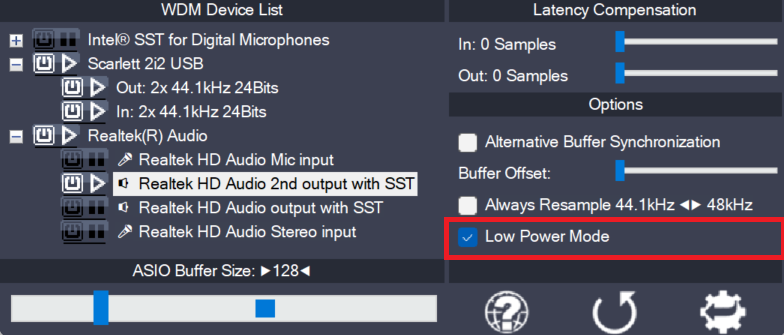
  • Low Power Mode

    Low Power Mode

    This is a global option – for the current audio host application – telling the ASIO4ALL main audio thread how to spend its idle time, i.e. the time when not calling the DAW audio processing handler. The default for this option is “enabled”, potentially lowering CPU utilization in idle mode. Depending on the current ASIO4ALL

    more

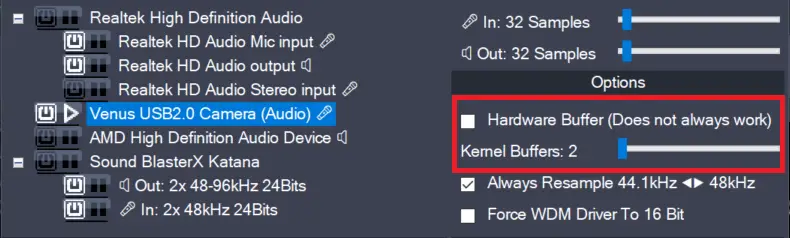
  • Hardware Buffer on/off (Obsolete)

    Hardware Buffer on/off (Obsolete)

    This feature has been removed in version 2.17!The only purpose it did serve – more than 20 years after its introduction – was to confuse users needlessly. Enables the hardware buffer for the highlighted device. This only works for so called “WavePCI” miniports, as other types of WDM drivers do not usually allow direct access

    more

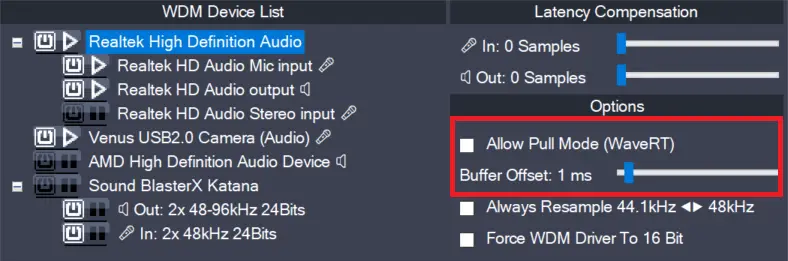
  • Allow Pull Mode (WaveRT) (obsolete)

    Allow Pull Mode (WaveRT) (obsolete)

    In version 2.17, this feature has been replaced by the “Alternative Buffer Synchronization” – option! There are two basic access methods for a WaveRT device, “pull-mode” (also called “event-mode”) and “push-mode” (also called “polling mode”). If this box is left unchecked, ASIO4ALL will not use “pull-mode”, otherwise it will use it whenever possible. The default

    more