
-
Version:
2.22

Release date:
Minimum OS required:
Windows 10
-
Introduction
Welcome to ASIO4ALL! This manual enables you to make the most of your ASIO4ALL installation, especially when it comes to the advanced features newly introduced in this Version of ASIO4ALL. In order to achieve the best possible results with ASIO4ALL it is recommended that your computer is configured accordingly. For updates, help and further information,…
-
Getting Started
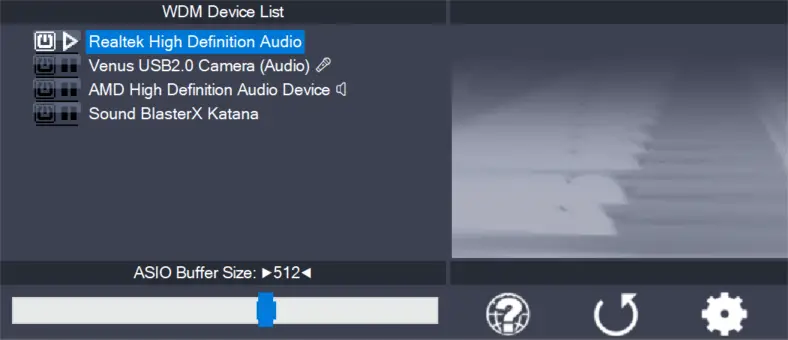
Setting up your audio software In order to make use of ASIO4ALL, you need to configure your audio software accordingly. How you would do this depends on your particular software application. Generally, you would always enter the audio configuration menu and select ASIO -> ASIO4ALL v2. There now should be a button to launch the…
-
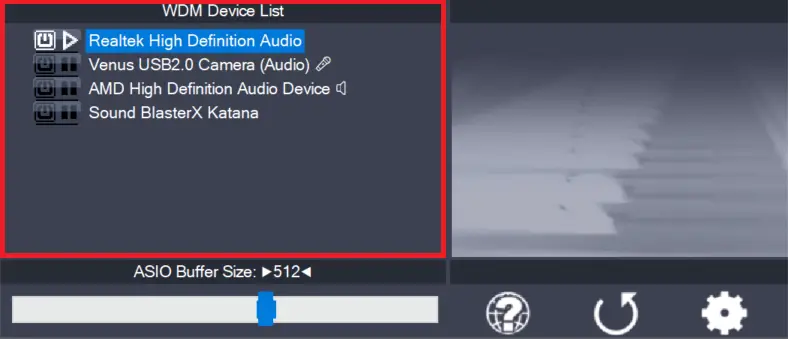
WDM Device List
This is the list of audio devices found in your system. Highlight the device that you want to make changes to. Note: All parameter changes always only apply to the device currently highlighted! Activate the device you want to use by clicking on the button next to the device name! In the picture above, the…